Collect pledges after the night
Charge the cards guests saved, send payment links to everyone else, and mark cash and cheques paid by hand.
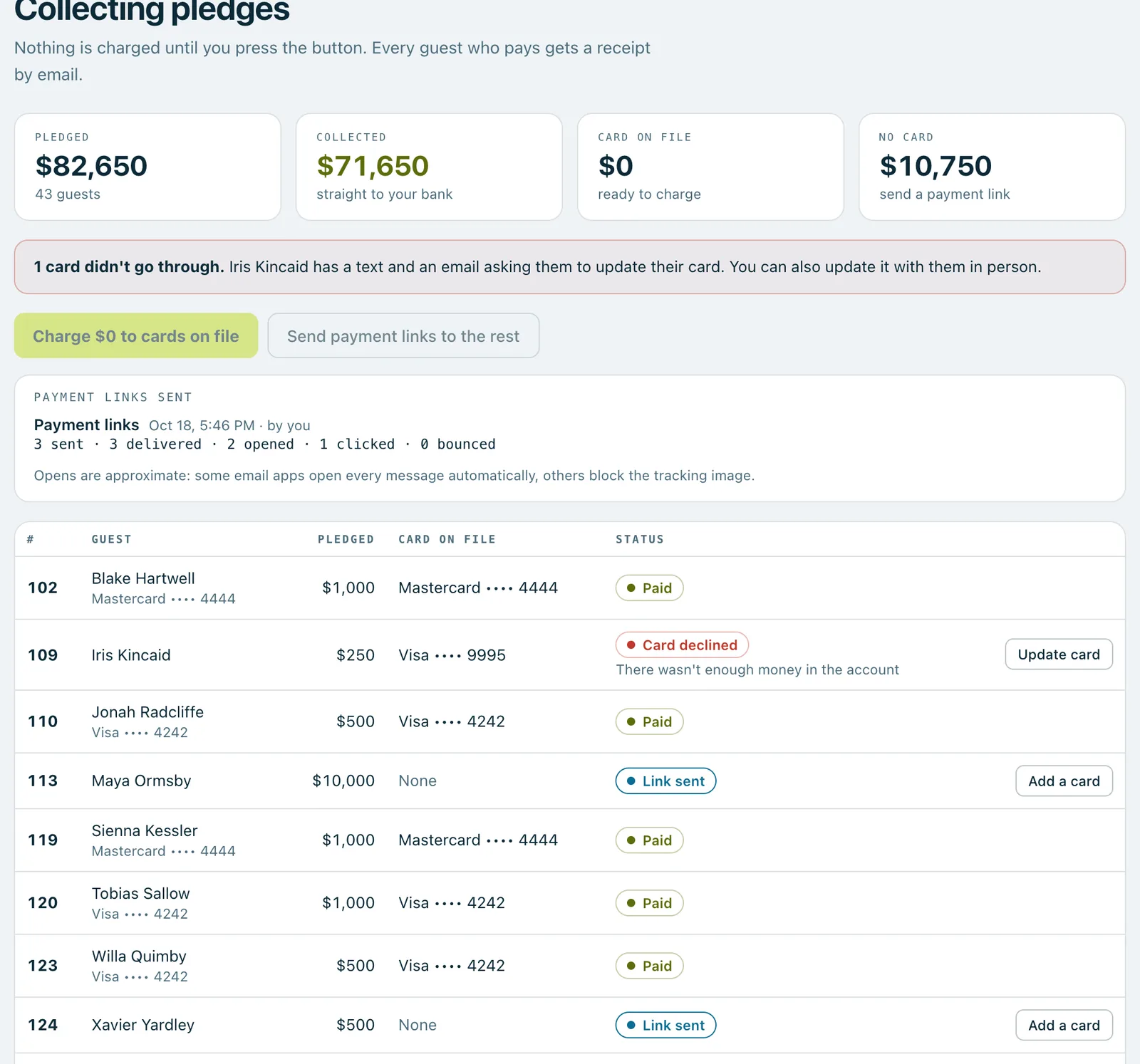
After the night, the Collecting pledges screen shows what each guest pledged and what's still to collect. Nothing is charged until you press the button, and every guest who pays gets a receipt by email.
Open the event and press Open collecting pledges on the Collecting pledges card.
Steps
- Check the totals at the top: Pledged, Collected, Card on file (ready to charge) and No card.
- Press Charge … to cards on file, read the box, and press the Charge button in it to confirm. Each guest's saved card is charged for their pledges, and they get a receipt straight away. You can leave the page while it runs.
- Press Send payment links to the rest, then Send links. Guests without a card get a message with their pledge amount and a link to pay with Apple Pay, Google Pay or a card.
A guest who paid another way
- Open the guest's row.
- Press Mark paid by hand.
- Choose how they paid: Cheque, Cash, Bank transfer or Another way. Check the amount, and add a cheque number or a note if you like.
- Leave Email them a receipt ticked if they should get one, and press Mark … paid. You can undo this straight after.
If a card doesn't go through
The screen says how many cards didn't go through. Those guests get a text and an email asking them to update their card. You can also open their row and press Update card to do it with them.
Good to know
Money arrives in your bank about 2 working days after a charge.
From a guest's row you can also Send the receipt again, or refund a payment with Refund…. Refunds go back to the card they paid with, usually within 5 to 10 days, and can't be undone. Owners can refund; managers can only if an owner has allowed it, with Allow refunds on the event's Volunteers tab.
Charges can't be undone either, but you can refund any charge afterwards.
Payments need to be set up first. Until they are, owners see a Set up payments button here, and you can still record pledges collected your own way.
Real screenshots of Paddlit, taken with a made-up organisation, Maple & Main Children's Fund.
Thanks for telling us.
Sorry it didn't. Sign in and get help, or ask without signing in.