Undo a check-in
Checked in the wrong person? Undo it straight away, or reverse it later from the guest's row, and see what happens to their number.
There are two ways to take back a check-in: Undo straight after, or Reverse check-in later from the guest's row. Door volunteers, managers and owners can do both.
Straight after: Undo
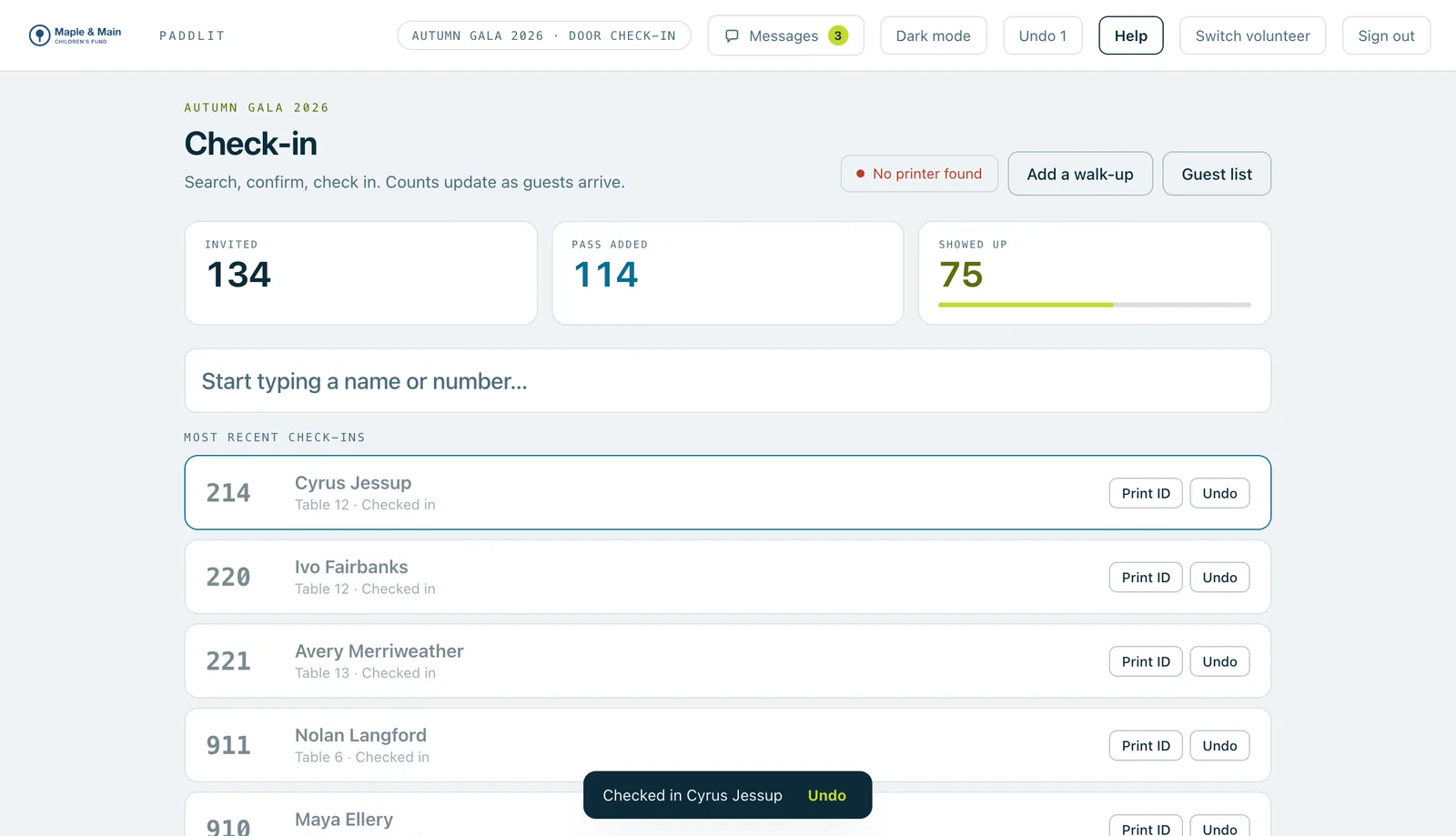
After every check-in, a message appears at the bottom of the screen, such as "Checked in Alice Whitfield", with an Undo button. Press it, and the check-in is taken back.
If you've missed the message, use Undo in the bar at the top of the screen. It takes back your most recent change first. On a laptop, Ctrl+Z (or ⌘Z on a Mac) does the same, as long as you're not typing in a box.
If the guest was given a bidder number at check-in, undoing it straight after gives that number back too, and the card in their phone wallet stops showing it.
Later: reverse the check-in
- On the door screen, search for the guest. Guests who are checked in show an Undo button on their row.
- Press Undo on their row.
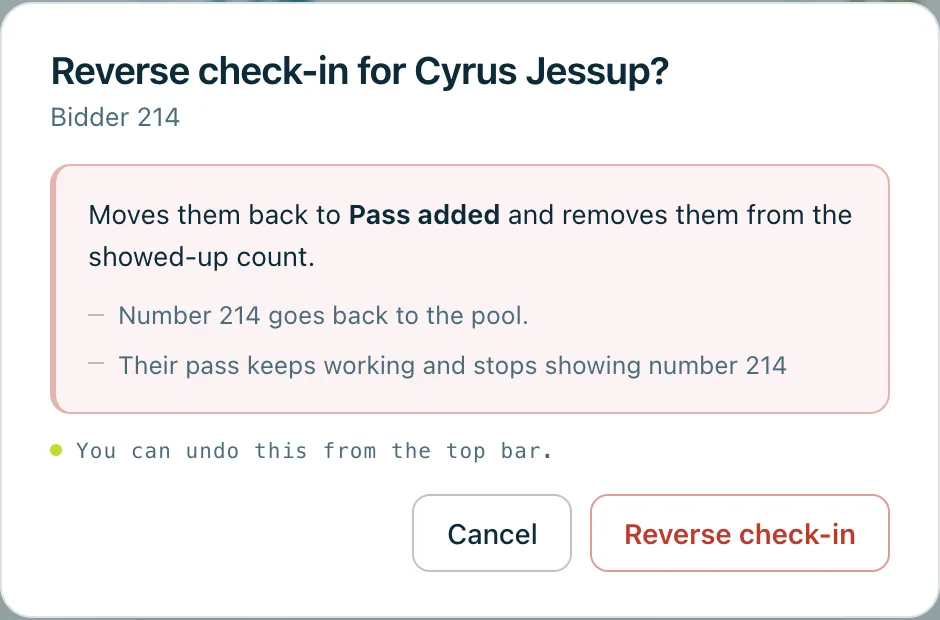
- Read the box that opens. It moves them back to Pass added (or Invited, if they never added their pass) and takes them off the showed-up count, and it says what happens to their bidder number.
- Press Reverse check-in.
What happens to their number
The box says one of two things.
"Number 214 goes back to the pool." This is when the door gave them the number at this check-in, or when they arrived as a walk-up, and nothing has been recorded since. The number can then go to the next guest who needs one. If they've added their pass, the box also says Their pass keeps working and stops showing number 214. If they haven't, it says Nothing is sent to their phone. In a household that shares one number, it goes back for all of them.
"They keep number 214 because …" The number stays theirs, and the box gives the reason:
- they're still checked in (for another day or sub-event),
- it wasn't given out at check-in (they had it before the night, or a manager gave it to them),
- someone else in their household is checked in,
- a pledge is recorded under it (a voided pledge counts too),
- a payment is recorded under it,
- they've made a donation since they arrived,
- a ticket was added for them since they arrived,
- they've placed a store order since they arrived,
- a card was saved for them since they arrived,
- a place was passed on since they arrived,
- a note was added for them since they arrived.
Then the box also says Their pass keeps working — nothing is sent to their phone.
Messages sent to them, the groups they're in and adding their pass to a phone wallet don't count as something recorded.
After you press Reverse check-in, the message at the bottom says it again, such as "Reversed check-in for Cyrus Jessup. Number 214 went back to the pool."
Undoing a reversal
You can undo the reversal straight after, the same way as above. If their number went back to the pool, it's theirs again as long as it's still free, and a pass on their phone shows it again. If it isn't free any more, the message ends "Number 214 isn't available any more, so they'll need a new number".
Good to know
Undo only takes back changes you made yourself, signed in on this device. Switching to another event or role clears what you can undo (the screen warns you first), and so does signing out.
If the event has days and sub-events, reversing a check-in is for the day or sub-event the door is checking in for. A guest who is still checked in for another one stays checked in for it, and keeps their number.
Real screenshots of Paddlit, taken with a made-up organisation, Maple & Main Children's Fund.
Thanks for telling us.
Sorry it didn't. Sign in and get help, or ask without signing in.